Showing posts with label new. Show all posts

Friday, January 20, 2017

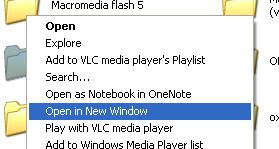
Open in new window option on right click

,
  • Go to Start >> Run.
  • Type regedit to open Registry Editor.
  • Before doing the following trick, take a back-up of your registry for safety.
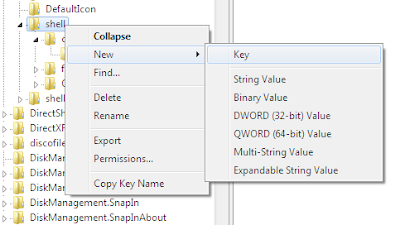
  • Now navigate to HKEY_CLASSES_ROOT >> Directory >> shell
  • Create a new key i.e. Right-click on shell Select New >> Key and name it as "Open in new Window" without double quotes


  • Now, Right-click on the key which you have created now and create a sub key with the name "command"
  • Now, On the right pane, double click Default and enter value explorer %1.
  • Now you can see new window option on right-click on any folder.
  • To make this option available for your drives, perform the same procedure on HKEY_CLASSES_ROOT >> Drive >> shell.
  • To undo this trick, simply remove the keys which you have created.
Read more

Friday, January 13, 2017

New ways to add Reminders in Inbox by Gmail

,


Last week, Inbox by Gmail opened up and improved many of your favorite features, including two new ways to add Reminders.

First up, when someone emails you a to-do, Inbox can now suggest adding a Reminder so you don’t forget. Heres how it looks if your spouse emails you and asks you to buy milk on the way home:
To help you add Reminders, the Google Research team used natural language understanding technology to teach Inbox to recognize to-dos in email.
And much like Gmail and Inbox get better when you report spam, your feedback helps improve these suggested Reminders. You can accept or reject them with a single click:
The other new way to add Reminders in Inbox is to create Reminders in Google Keep--they will appear in Inbox with a link back to the full note in Google Keep.
Hopefully, this little extra help gets you back to what matters more quickly and easily. Try the new features out, and as always, let us know what you think using the feedback link in the app.
Read more

Saturday, January 7, 2017

Happy New Year

,

Confused? Well today is Matariki, the M?ori New Year. Matariki is the M?ori name for the constellation of stars that other cultures call the Pleiades or the Seven Sister. Today the constellation first rises above the horizon just before dawn. Of course its also reasonably close to the winter solstice (in the Souther hemisphere) and so makes a natural way of marking the end of one year and the start of a new year. There are lots of information, resources online and events to celebrate the occasion. 


from The Universal Machine http://universal-machine.blogspot.com/

IFTTT

Put the internet to work for you.

Delete or edit this Recipe

Read more

Saturday, December 24, 2016

Double click on a drive opens in new window

,
Problem:
When i double-click on a drive, it opens in new window. What is the problem, Is it because of a virus. Please help me.

Solution:
  • Open any explorer window, Click on Tools >> Folder options >> View.
  • Click on restore defaults.
If this does not solve your problem the it may be because of a virus attack.
You can perform the following steps to get rid of this.

Solution 1
  1. Open start menu and click Run.
  2. Type regsvr32 /i shell32.dll
  3. Click Ok and if this message shows “DllRegisterServer and DllInstall in shell32.dll succeeded” that means the problem is solved.

Solution 2
  1. In Run type regedit.exe to open the registry editor.
  2. Traverse to HKEY_CLASSES_ROOT/Directory/Shell
  3. Double click on the default value on right and set it as “none”.
  4. Repeat the procedure for the key HKEY_CLASSES_ROOT/Drive/Shell.

Solution 3
Alternatively, you can download a registry file and merge it with your registry by double clocking it. Reboot your system after merging the file.
One of the methods listed above will definitely solve your problem.
Read more

Tuesday, November 29, 2016

New Stuff

,
Hi Everybody!

We have a new page called Student Work with sides shows of student projects created on the computer. Check it out!

We also have a new Donors Choose project posted. We are raising money to buy digital frames so we can display student work in school in a slide show just like on the new page. Click on the link below to go to Ms. Bransons Donors Choose site to donate to our project.

http://www.donorschoose.org/ms.branson
Read more

Thursday, October 27, 2016

1 Android newbies 10 new apps worth checking out

,

Every day there are thousands of new entries on the Google Play store, but many go unnoticed and never receive the attention they deserve. So, I will bring weekly column Android newbies that highlights new apps with less than 100k installs. Browse my new app picks and let me know which ones you enjoy.

1.Dreamboard


Cannot remember your dreams? Want to analyze them? Lucid dreaming? Use Dreamboard Mobile on your Android smartphone and on the web. Create, annotate and browse your private personal dream journal. Past dreams are saved for you to read, rediscover and update at any time. Observe trends in their dreaming activity. Dreamboard finds similarities between past dreams, aggregates dream data in a private dashboard and gives users feedback about their dreams.

Download


2.ImGame


 ImGame is a new video game social network connecting you with your friends across social channels and consoles. Check-in to games, and other ImGamers connected to you automatically get push notifications letting others know that you’re online and gaming. Collect custom tokens for checking into games, and PWN the titles you check in to more than other ImGamers. Now you can focus on playing your favorite titles instead of trying to figure out which friends are signed into which platforms/titles and when.

Download


3.Homesnap


 Snap a photo of any home to identify it and find out the value, the price it last sold for, how many bedrooms, how many baths, local schools, and much more! Explore homes for sale, open houses, recent sales, and check values for 90+ million homes in the USA from the comfort of your couch! Search by address, customize your search, drag the map or flick the list.

Download


4.CookWizMe


CookWizMe is the best Android App for people who love to cook. With CookWizMe cooking becomes easy, fun, and social! All recipes on CookWizMe have step-by-step photo instructions that leave you no chance to fail. Whenever you need a cooking inspiration, browse the recipe feed and hit the kitchen!

Download


5.Flayvr


With Flayvr, all your photos and videos are magically sorted into exciting fun albums to keep or share with friends. Flayvr puts an end to endless scrolling in your photo gallery or photo browser in search of your favorite life moments. Flayvr is the easiest way to re-experience your most precious memories. Simply keep on shooting with any Android camera and let Flayvr do its magic!

Download


6.XonoMail


XonoMail is the first mail app that automatically categorizes your email. In the inbox, our smart app adds a category icon next to your email so at a quick glance, you see what the email is about.

Download


7.Loss of the Night


Take part in a world-wide citizen science project that measures star visibility and light pollution. Help create a database for research on health, environment and society by telling scientists which stars you can see at your location.

Download


8.ArcNote


The easiest way to take perfect notes with your Android phone camera. Whether grabbing content from a whiteboard, slide projection, poster or brochure, ArcNote will automatically crop and correct skewed presentations into nice visual notes. No more jotting down messy notes. No more missing important details. Save your time. Free up your hands. All you need to do is take a snapshot and let the app do the rest. Instantly share your notes with colleagues and friends.

Download


9.Fixya


Have a product question? Ask almost anything by using your device’s video camera to easily communicate your problem instead of trying to describe it with just text. Helpful Fixya community members will watch your video problem and will try their best to provide you a solution. As a part of the Fixya community, you can help other members with their video questions too. It’s fun and helpful!

Download


10.Splay Launcher


Welcome to the Beta version of the Splay, a unique home launcher for Android devices that puts your own activity preferences at the heart of your mobile experience. Set the Splay as your default home screen and start enjoying a single hand operation with a fast, smooth and efficient access to your most essential activity using just one finger.

Download


Read more

Tuesday, October 4, 2016

What does Privacy Mean to New Zealanders in the Internet Age

,

This Thursday is the 1st lecture in the annual Gibbons Memorial lecture series. The first lecture is by Professor Miriam Lips of the School of Government, Victoria University of Wellington, titled: What does Privacy Mean to New Zealanders in the Internet Age?

When: 6pm (refreshments) for 6.30pm lecture start, Thursday 1st May, 2014
Where: Owen G Glenn Building, Room OGGB3/260-092
Note that there is public parking in the basement of the Owen G Glenn Building at 12 Grafton Road.

Miriam Lips is the first Professor of E-Government at Victoria University of Wellington. This chair is sponsored by industry - Datacom System, FX Networks, Microsoft New Zealand – and the NZ government - the State Services Commission and the Department of Internal Affairs.

Professor Lips holds a MSc and a PhD from Erasmus University Rotterdam and an EMPA from Erasmus University, Leiden University and the Hochschule für Verwaltungswissen-schaften, Speyer. She has held academic positions at the University of Oxford and Tilburg University. Her current research includes management of online identity, use of social media for public engagement, the use of e-campaigning and the use of new media in disaster management.

Synopsis: Based on a 2013 survey with a representative sample of the New Zealand population, this talk will explore how, and to what extent, different groups of the New Zealand population are disclosing and protecting their personal information in varying online relationships with the private sector, government, and family and friends through social networking. The meaning of privacy for people from different age groups, ethnicities, educational backgrounds, and income groups will be discussed, and the implications for a population which increasingly exchanges their identity information online, against the backdrop of new privacy challenges and risks emerging from the use of Big Data.

from The Universal Machine http://universal-machine.blogspot.com/

IFTTT

Put the internet to work for you.

via Personal Recipe 895909

Read more

Sunday, September 18, 2016

New Research Challenges in Language Understanding

,


We held the first global Language Understanding and Knowledge Discovery Focused Faculty Workshop in Nanjing, China, on November 14-15, 2013. Thirty-four faculty members joined the workshop arriving from 10 countries and regions across APAC, EMEA and the US. Googlers from Research, Engineering and University Relations/University Programs also attended the event.

The 2-day workshop included keynote talks, panel discussions and break-out sessions [agenda]. It was an engaging and productive workshop, and we saw lots of positive interactions among the attendees. The workshop encouraged communication between Google and faculty around the world working in these areas.

Research in text mining continues to explore open questions relating to entity annotation, relation extraction, and more. The workshop’s goal was to brainstorm and discuss relevant topics to further investigate these areas. Ultimately, this research should help provide users search results that are much more relevant to them.

At the end of the workshop, participants identified four topics representing challenges and opportunities for further exploration in Language Understanding and Knowledge Discovery:

  • Knowledge representation, integration, and maintenance
  • Efficient and scalable infrastructure and algorithms for inferencing
  • Presentation and explanation of knowledge
  • Multilingual computation

Going forward, Google will be collaborating with academic researchers on a position paper related to these topics. We also welcome faculty interested in contributing to further research in this area to submit a proposal to the Faculty Research Awards program. Faculty Research Awards are one-year grants to researchers working in areas of mutual interest.

The faculty attendees responded positively to the focused workshop format, as it allowed time to go in depth into important and timely research questions. Encouraged by their feedback, we are considering similar workshops on other topics in the future.
Read more

Sunday, September 4, 2016

How to remove New Folder exe Virus manually or using software

,
New Folder.exe Virus
New Folder.exe virus mostly spread through the USB drive. It cannot be deleted normally. Here are the steps to remove this virus easily
  1. Find out all the locations of the “newfolder.exe” virus.
  2. Open the task manager and end the newfolder.exe process running in background.
  3. Open cmd and then type “dir /a XXX” where XXX is the name of the folder where the virus is.
  4. Then type “cd XXX”.
  5. Delete the file by typing “del name_of_file”.
  6. Then remove the whole folder by typing “rmdir /s XXX”.
  7. The virus has been removed just see the task manager once again and end the newfolder.exe process running in the background (if any).
  8. Restart the system.
There is also a software utility available for this purpose. Click to download
Run this software in safe mode to remove the virus easily.
Read more

Wednesday, August 3, 2016

Google Databoard A new way to explore industry research

,


It’s important for people to stay up to date about the most recent research and insights related to their work or personal lives. But it can be difficult to keep up with all the new studies and updated data that’s out there. To make life a bit easier, we’re introducing a new take on how research can be presented. The Databoard for Research Insights enables people to explore and interact with some of Google’s recent research in a unique and immersive way. The Databoard uses responsive design to to offer an engaging experience across devices. Additionally, the tool is a new venture into data visualization and shareability with bite-sized charts and stats that can be shared with your friends or coworkers. The Databoard is currently home to several of Google’s market research studies for businesses, but we believe that this way of conveying data can work across all forms of research.


Here are some of the things that make the Databoard different from other ways research is released today:

Easy to use
All of the information in the Databoard is presented in a bite-sized way so that you can quickly find relevant information. You can explore an entire study or jump straight to the topics or data points you care about. The Databoard is also optimized for all devices so you can explore the research on your computer, tablet or smartphone.

Meant to be shared
Most people, when they find a compelling piece of data, want to share it! Whether it’s with a colleague, client, or a community on a blog or social network, compelling insights and data are meant to be shared. With the databoard, you can easily share individual charts and insights or collections of data with anyone through email or social networks, just look for the share button at the top of each chart or insight.

Create a cohesive story
Most research studies set out to answer a specific question, like how people use their smartphones in stores, or how a specific type of consumer shops. This means that businesses need to look across multiple pieces of research to craft a comprehensive business or marketing strategy. With this in mind, the Databoard lets you curate a customized infographic out of the charts or data points you find important across multiple Google research studies. Creating an infographic is quick and easy, and you can share the finished product with your friends or colleagues.

The databoard is currently home to six research studies including The New Multi-screen World, Mobile In-store shopper research and Mobile search moments. New studies will be added frequently. To get started creating your own infographic, visit the Databoard now.
Read more

Saturday, July 30, 2016

New Zealands Great Walks added to Google Maps

,

If youve always wanted to walk one of New Zealands classic walks now you can without even breaking a sweat. Google has added several classic NZ walks, such as the Milford Track, to Google street view within Google Ma ps. This was reported in the New Zealand Herald last week.

from The Universal Machine http://universal-machine.blogspot.com/

IFTTT

Put the internet to work for you.

Turn off or edit this Recipe

Read more

Sunday, July 10, 2016

4 Android newbies 10 new apps worth checking

,

Every day there are thousands of new entries on the Google Play store, but many go unnoticed and never receive the attention they deserve. So, I will bring weekly column Android newbies that highlights new apps with less than 100k installs. Browse my new app picks and let me know which ones you enjoy.

1. Clueful

Clueful for Android is a free product that shows you how installed apps use, and possibly abuse, your personal information and treat your privacy. You’d be surprised how many things an app can learn about you. Without you ever knowing it. Clueful is like your own personal “Privacy Consultant” giving you detailed info as to what your installed apps are doing in the background without your knowledge.

Download

2. Textra

Let’s face it the stock Android Messaging app really sucks! So time for something new, something pretty damn special, right? It’s here! It’s called Textra; a feature rich complete SMS and MMS replacement app. Textra is a seriously beautiful way to text.

Download

3. EasilyDo

EasilyDo gets you the right information and gets things done. It tells you when to leave to arrive on time, monitors for important emails and friends’ news, warns you of bad weather, tracks packages, files receipts, and even helps you celebrate birthdays. Information automatically appears when you need it – no more digging through multiple apps!

Download

4. Whisper

Whisper is an anonymous social network that lets you share confessions, express yourself and meet new people. With Whisper you can connect with other people who think & feel the same way you do about things. Whisper is a great place to meet people, whether you’re looking for new friends, searching for your soulmate, or just someone to laugh with!

Download

5. ParkMe

Park your car smarter and faster with ParkMe, the world’s largest and most accurate database of parking info. View informative maps of parking lots and garages in your area. Check parking rates, see prices laid out on the map and compare costs. See real-time info on exactly how many spots are open in a particular garage or lot.

Download

6. Listen & Speak

Speak the foreign language like a native with “Listen & Speak”. It uses an advanced learning technique where short language patterns are read, understood, and pronounced in sequence. The application then analyzes your pronunciation, telling you how well you have done. You can also directly compare your recording to the reference version. By going through the set of such patterns you quickly built up the necessary skills and become proficient in speaking freely the language of your choice.

Download

7. TasteFilter

What if you could navigate the vast musical universe by swiping your fingertip across a screen? To get started, all you have to do is enter an artist or music genre. Then Taste Filter springs into action, delving into a database that includes thousands of musicians and millions of songs to instantly suggest similar music that you may enjoy.

Download

8. Fraction Plus

I’m Fraction Calculator Plus and I’m the best and easiest way to deal with everyday fraction problems. Whether you’re checking homework, preparing recipes, or working on craft or even construction projects, I can help.

Download

9. CellMaps

With CellMaps Mobile Coverage, you can quickly map network coverage by operator and technology on your Android device. This application does not use crowd-sourced data or your device’s current signal strength for displaying cellular information; it provides a view of each operator’s marketed coverage area and the ability to check and compare networks in the premium version.

Download

10. Soundhalo

Soundhalo
Soundhalo is an evolutionary new platform that allows music lovers to buy, share and own artist endorsed live video and audio recordings as it happens. Fans can now purchase and download the actual performance as it unfolds, whether they are at the gig or on the other side of the globe.

Download


Read more

Friday, July 1, 2016

Teaching machines to read between the lines and a new corpus with entity salience annotations

,


Language understanding systems are largely trained on freely available data, such as the Penn Treebank, perhaps the most widely used linguistic resource ever created. We have previously released lots of linguistic data ourselves, to contribute to the language understanding community as well as encourage further research into these areas.

Now, we’re releasing a new dataset, based on another great resource: the New York Times Annotated Corpus, a set of 1.8 million articles spanning 20 years. 600,000 articles in the NYTimes Corpus have hand-written summaries, and more than 1.5 million of them are tagged with people, places, and organizations mentioned in the article. The Times encourages use of the metadata for all kinds of things, and has set up a forum to discuss related research.

We recently used this corpus to study a topic called “entity salience”. To understand salience, consider: how do you know what a news article or a web page is about? Reading comes pretty easily to people -- we can quickly identify the places or things or people most central to a piece of text. But how might we teach a machine to perform this same task? This problem is a key step towards being able to read and understand an article.

One way to approach the problem is to look for words that appear more often than their ordinary rates. For example, if you see the word “coach” 5 times in a 581 word article, and compare that to the usual frequency of “coach” -- more like 5 in 330,000 words -- you have reason to suspect the article has something to do with coaching. The term “basketball” is even more extreme, appearing 150,000 times more often than usual. This is the idea of the famous TFIDF, long used to index web pages.
Congratulations to Becky Hammon, first female NBA coach! Image via Wikipedia.
Term ratios are a start, but we can do better. Search indexing these days is much more involved, using for example the distances between pairs of words on a page to capture their relatedness. Now, with the Knowledge Graph, we are beginning to think in terms of entities and relations rather than keywords. “Basketball” is more than a string of characters; it is a reference to something in the real word which we already already know quite a bit about.

Background information about entities ought to help us decide which of them are most salient. After all, an article’s author assumes her readers have some general understanding of the world, and probably a bit about sports too. Using background knowledge, we might be able to infer that the WNBA is a salient entity in the Becky Hammon article even though it only appears once.

To encourage research on leveraging background information, we are releasing a large dataset of annotations to accompany the New York Times Annotated Corpus, including resolved Freebase entity IDs and labels indicating which entities are salient. The salience annotations are determined by automatically aligning entities in the document with entities in accompanying human-written abstracts. Details of the salience annotations and some baseline results are described in our recent paper: A New Entity Salience Task with Millions of Training Examples (Jesse Dunietz and Dan Gillick).

Since our entity resolver works better for named entities like WNBA than for nominals like “coach” (this is the notoriously difficult word sense disambiguation problem, which we’ve previously touched on), the annotations are limited to names.

Below is sample output for a document. The first line contains the NYT document ID and the headline; each subsequent line includes an entity index, an indicator for salience, the mention count for this entity in the document as determined by our coreference system, the text of the first mention of the entity, the byte offsets (start and end) for the first mention of the entity, and the resolved Freebase MID.
Features like mention count and document positioning give reasonable salience predictions. But because they only describe what’s explicitly in the document, we expect a system that uses background information to expose what’s implicit could give better results.

Download the data directly from Google Drive, or visit the project home page with more information at our Google Code site. We look forward to seeing what you come up with!
Read more

Friday, April 15, 2016

3 Android Newbies 10 new apps worth checking out

,


Evey day there are thousents of new entries on the Google play store, but many go unnoticed and  never recieve the attention they deserve. So, I am bringing this weekly column Android Newbies that highlights new apps with less than 100k installs. Browse new Android app picks below and let me know which ones you enjoy.


1. Tapatalk 4

Tapatalk 4 - Community ReaderCelebrating our 4 years anniversary – This is the public beta release of Tapatalk 4. Discover great internet communities or stay connected with your favourites community on-the-go with this award-winning mobile app. Tapatalk is the only mobile app combing over 50,000+ internet communities with a streamlined mobile experience, allowing you to share and follow thoughts, photos, opinions to all your communities within a single mobile app.

Download

2. Duolingo

Learn Spanish, French, German, Portuguese, Italian, and English. It’s free, for real. No fees, no ads, no gimmicks. A college-quality education without the price tag. It’s fun. Lose hearts for answering incorrectly, advance by completing bite-sized lessons, and track your progress with shiny achievements.

Download

3. ArtFlow

ArtFlow - Sketch, Paint, Draw
Convert your tablet into digital sketchbook with more than 50 brushes, smudge, file and eraser tool. This fast and intuitive paint application will unlock full power of your imagination. With support for pressure sensitive pens (like Samsung’s SPen) you device will be changed into real canvas.

Download

4. Boxfish

Boxfish TV Guide

Boxfish Live Guide – the new TV guide. See whats happening live across your favorite channels. Find what’s trending on TV right now with our live feeds from every word spoken on TV. Use our unique ‘live windows’ to keep track of what is happening on all of your favorite channels and shows, all in real time.

Download

5. NodeBeat

NodeBeat Special

Make music with NodeBeat, the intuitive and fun visual music app for all ages. Whether you’re 2 or 92, NodeBeat will make you sound like a pro. Create your own music in a matter of minutes or listen to NodeBeat generate its own. Easily record and share your creations with your friends.

Download

4. Next Browser

Next Browser

From the makers of GO Launcher, Next Browser provides you fast and smooth web surfing experience. It’s a totally free app. Download for free and try it now, and you will love it. I ve tried it and after 3 days it become my first browser.

Download

6. Buycott

Buycott

Buycott helps you organize your everyday consumer spending to support causes you care about. Join a campaign to help a cause you care about and commit to actively supporting the companies on your side of the issue, while avoiding those that oppose your position. Lookup the ownership structure of any product and trace it all the way back to its parent company with our interactive family tree diagram.

Download

7. Wink!

Wink is a fun and private photo chat. Everything you love about Snapchat and Instagram in one app. Say Hello to Friends with a Photo! You don’t need to add your friends like on Snapchat, Kik, Line, or MessageMe. Start a photo chat with any of your contacts. You can immediately message any of your phone contacts.

Download

8. Jamstar

Learn to play the guitar with Jamstar Acoustics…it’s fun, fast, and free! Jamstar Acoustics comes with over 100 exciting lessons including basics, soloing, chords, scales, rock riffs and much more! Plus, learn songs from the biggest names in rock including Led Zeppelin, Green Day, Evanescence and R.E.M. (to name just a few).

Download

9. SickSky Launcher

sicksky-630
SickSky is an extremely minimalistic launcher for phones. Designed to be clean and simple.

Download

10. How to make Origami

origami-howset-630

Remember making paper airplanes at school? And remember how someone, instead of an airplane, made a flower, a jumping frog, or a parrot? That was like magic. And they only had their two hands and a plain piece of paper. How did they do it? We’ll show you how. The “How to Make Origami” app is simple and easy to use. Follow the step-by-step instructions and watch the 3D animation carefully. And don’t worry, you’d have to try really hard to get confused.

Download

Read more
 

Computer Info Copyright © 2016 -- Powered by Blogger