Showing posts with label videos. Show all posts

Saturday, December 31, 2016

Playing YouTube videos in the browser on the Raspberry Pi

,
This will allow you to stream up to 1080p youtube videos in the browser on the Raspberry pi using omxplayer. Its a crude hack but it seems to work pretty well on my system. Install instructions and a demonstration video are shown below.

You can install this by pulling the git repository and running the scripts below.
Commands to install are below (your user should have sudo privileges but you dont need to be root):

You may have to enable user scripts in Midori by going to Menu>Preferences>Extensions>UserScripts and clicking the check box.


sudo apt-get install git-core
git clone git://github.com/StevenHickson/PiAUISuite.git
cd PiAUISuite/Install/
./InstallAUISuite.sh

**NOTE, this will ask you if you want to install a lot of different scripts because it is a SUITE. You only have to pick the ones you want to use. If you only want to use the youtube scripts, press n on any other question except for the dependencies and youtube.

Update Instructions 

cd PiAUISuite
git pull
cd Install
sudo ./UpdateAUISuite.sh


Demonstration


There is a lot of misinformation out there on how to do this. Using gnash or HTML5 is going to result in a frame rate so slow it can be considered unworkable. Ive tried both of them out and you cant really watch videos with them. XBMC has a youtube plugin but it is buggy and crashes often.

Ive been playing youtube videos using the command line and my voicecommand using the scripts found here.
After seeing a couple people ask about playing youtube in the browser last night, I decided to go ahead and do that and create some user scripts for midori which allow the browser to utilize the same hack.

Here is the technical overview:
I created a script called youtube which uses the youtube-dl -g flag to grab the video URL. It also handles playlists and other parsing. Then it passes that video URL to omxplayer for it to stream. 
Next I registered a new URL protocol yt:// and made it pass its information to the youtube program whenever it runs. 
Finally, I created a user script in Midori which simply replaces all http://youtube.com/watch?* URLs with yt://youtube.com/watch?*.

Feel free to let me know any problems you have and enjoy your Youtube browsing experience.


 Consider donating to further my tinkering


Places you can find me
Read more

Saturday, October 29, 2016

Very easy to download youtube videos audio mp3 format

,


you can easily download youtube videos MP3 format
So we have a video from Youtube, download video format but do not format audio. Many mega bytes audio save you a good opportunities for those who want to download format. Assume whatever tips you know.
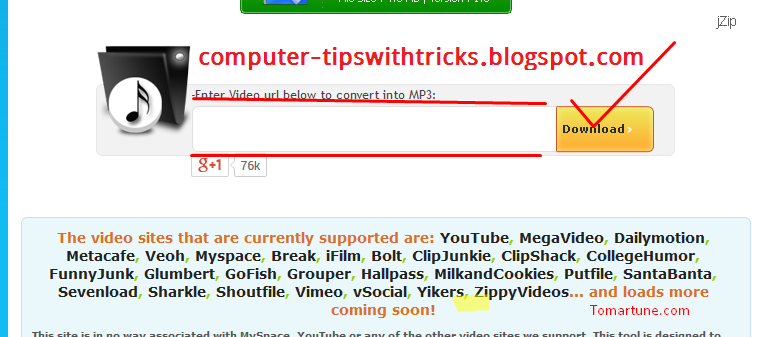
First go to this link Click to download youtube videos in mp3 format, you will see this picture shown bellow-


Then mark the red spot in the box and paste the link to your youtube video and then click download.
Then a few second you will verify the link and download will start automatically.  


Read more

Friday, September 16, 2016

Fast download youtube videos only video tutorial

,


watch this video the you can easily download youtube videos without any problems...

Read more

Monday, May 23, 2016

Rebtel introduce unlimited international calling for 1 month

,
Rebtel introduce unlimited international calling for $1/month
The Swedish VoIP provider, Rebtel, yesterday launched Rebel calling for its US customers, the package will allow US-based customers to access unlimited, free-app-to-app calling without necessarily using a WiFi connection.

Making international calls usually attracts ridiculous charge rates, much more using apps like Tango, Facetime ,WhatsApp and the likes requires a lot of data which in most cases are beyond whats budgeted.

Rebel app makes use of a WiFi connection to place an app-to-app call, but the calls are routed through local phone lines, this process does not require data nor WiFi, allowing users to make international calls easily without having to break their data plans.

Rebel is free in more than 50 countries including the U.S., the service comes with a cheaply cost of $1/month from 2017. In case, Rebel calling service is not available in your jurisdiction, users can make use of  Rebtel calling service for $2/month, to use this service you must be connected to the internet.


TechCrunch
Read more

Friday, February 5, 2016

Playing videos intelligently with the Raspberry Pi

,
This is a script designed to intelligently and quickly find and play any of your videos.
This is the first script in my AUI (Alternative User Interface) Series.

I found myself getting frustrated with delving through lots of different folders in order to find a tv show or movie. To keep things well organized requires a hierarchical structure and a lot of work, which also makes it harder to browse to the file in the current GUI environment.

This script aims to locate and play your videos intelligently (right now it uses omxplayer but it could be easily ported to use vlc)

It uses regular expressions and a database to quickly find your movie or tv show.

Ex.
playvideo Movie title
will quickly find and play Movie title

playvideo -r -f Show title
will quickly find and play a random "Show title" episode

playvideo -s 01 -e 01 Show title
will quickly find and play "Show title" Season 1 Episode 1

To install, download the zip here and run the InstallAUISuite.sh file located in the Install folder. It will ask you the media location in the install script.
For example, mine is /media/ExternalHD/movies

You can also choose to manually install but if so, make sure you run with the -set option. ex. playvideo -set /media/ExternalHD/movies

For the next part of my AUI Series, autonomous downloads, click here.

The man page of playvideo is shown below:

NAME

playvideo - Locate and play a video[s]  

SYNOPSIS

playvideo [OPTIONS]... [FILENAME]  

DESCRIPTION

playvideo was developed to speed up/ease the playing of videos using omxplayer on the rasperry pi. It can play movies using a single search term or play tv shows using a season and episode search term. It is based off common video naming conventions and supports mp4, avi, mkv, mov, mpg, flv, m4v, and mp3 files. It also supports randomization. It is currently in Beta and kind of a hack. Any useful suggestions are welcome. It is important to run playvideo the first time with the -set option to create the database (especially if you are using external media). Note: If you used InstallAUISuite.sh, then this has already been done for you.

OPTIONS

-set, -Set MEDIA_ROOT
       Sets up the user parameters and creates a locate db for the media root. Ex. if all your videos are located in /media/Drive1/videos you would run:

      playvideo -set /media/Drive1/videos
-season, -Season, -s, -S NN
       Selects the asked file based off the given season number NN which has to be a two digit number to follow current conventions. Doesnt require an episode number.

      Ex. playvideo -Season 02 Show title

-episode, -Episode, -e, -E N/NN
       Selects the asked file based off the given episode number N or NN which can be a one or two digit number to follow current conventions. Requires a season number to be set as well.

      Ex. playvideo -S 02 -E 01 Show title

-random, -r
       Randomizes the output list of videos.

-first, -f
       Plays the first video from the list. Can be used with the random flag.

-multi, -m
       Plays all of the given list based on the query. Requires CTRL+C to quit given that it runs omxplayer individually for each file.


-continue, -c N
       Continues to play N number of matches. If given a season and episode, it will continue playing the next episodes in order until N episodes have been reached. If given the multiple flag, it will play matches until N has been reached.


-help, -h, --help
       Displays this page.


       The script can now handle names without quotes by replacing spaces with the regex * expression.

      Ex. playvideo Movie title


       The Set up function will also set up a cron job to update the db every day for new files. This will be done in the background and is fairly quick.
 

AUTHOR

Steven Hickson (help@stevenhickson.com) 

Consider donating to further my tinkering.


Places you can find me
Read more

Tuesday, February 2, 2016

Released Data Set Features Extracted From YouTube Videos for Multiview Learning

,

“If it looks like a duck, swims like a duck, and quacks like a duck, then it probably is a duck.”
The “duck test”.

Performance of machine learning algorithms, supervised or unsupervised, is often significantly enhanced when a variety of feature families, or multiple views of the data, are available. For example, in the case of web pages, one feature family can be based on the words appearing on the page, and another can be based on the URLs and related connectivity properties. Similarly, videos contain both audio and visual signals where in turn each modality is analyzed in a variety of ways. For instance, the visual stream can be analyzed based on the color and edge distribution, texture, motion, object types, and so on. YouTube videos are also associated with textual information (title, tags, comments, etc.). Each feature family complements others in providing predictive signals to accomplish a prediction or classification task, for example, in automatically classifying videos into subject areas such as sports, music, comedy, games, and so on.

We have released a dataset of over 100k feature vectors extracted from public YouTube videos. These videos are labeled by one of 30 classes, each class corresponding to a video game (with some amount of class noise): each video shows a gameplay of a video game, for teaching purposes for example. Each instance (video) is described by three feature families (textual, visual, and auditory), and each family is broken into subfamilies yielding up to 13 feature types per instance. Neither video identities nor class identities are released.

We hope that this dataset will be valuable for research on a variety of multiview related machine learning topics, including multiview clustering, co-training, active learning, classifier fusion and ensembles.

The data and more information can be obtained from the UCI machine learning repository (multiview video dataset), or from here.
Read more

Thursday, July 10, 2014

Learning AutoCAD 2012 and Advanced AutoCAD 2012 Training Videos

,

Obviously you want to learn more about AutoCAD because you came to CAD-a-Blog.com.   If you are interested in more in-depth AutoCAD training then take a look at my AutoCAD 2012 training Videos;
Learning AutoCAD 2012 and Advanced AutoCAD 2012.

Each video contains about thirteen hours of training sessions and come with hands on files to use during each session.  Many of the chapters end with a project that will incorporate what you learned.   The Learning AutoCAD title has a final project that incorporates several chapter projects.  These projects build on top of each other and naturally progress through the training sessions.  This helps to demonstrate the development process of making drawings in AutoCAD.  The Advanced title ends with a discussion and example of Best AutoCAD Practices.

If you’ve never used AutoCAD before and want to learn or it has been a long time then check out the Learning AutoCAD 2012 video.  If you have been using AutoCAD and want to know it better, check out the Advanced AutoCAD 2012 video.  Each vide comes on a DVD that can be played on a PC or on a MAC.

Don’t want to wait for the DVD to ship?  There is an instant download version available for each title.

Can’t decide which title to get?  Get both!  Don’t pay full price for each title.  Save some money and get the AutoCAD Bundle.  There are two; one fore AutoCAD 2011 and one for AutoCAD 2012.

Do you have an iPad?  The publisher of these videos, Infinite Skills, has a free iPad app that allows access to some of the AutoCAD training videos as well as a many other training titles produced by Infinite Skills.

Have an iPhone or an iPod Touch and want AutoCAD training?  There’s an app for that.  Check out the Learn AutoCAD 2011 Quickly and Easily app from Infinite Skills.  It takes my training videos and allows you to watch them on your iOS based device.  This app is available for the iPhone, iPod Touch and iPad.  They are AirPlay enabled to allow you to view your videos on your television if you are set up to do so.  They also include the working files so you can watch the video on your iPad while you use AutoCAD on your computer.
Screen shot of iPhone App

Regardless of which video your purchase or on which platform you watch them on, you will be receive quality training.  Each video was scripted, prepared and taught by me, Brian Benton.  I have been working with AutoCAD professionally since the early 1990’s in many different design fields.  I write for Cadalyst magazine and am active with AUGI, writing for their publications and also serve as the Hotnews Manager.   You aren’t purchasing generic, low quality YouTube videos.  These are high quality screen recordings and voice overs.  Each lesson provides in-depth insight on the various AutoCAD tools.  I don’t just tell you about the command and where to click to start it.  I go into detail on why you want to use specific tools and when to use them.  I share with you my decades of experience in using AutoCAD in real life situations.  I show you what to do and what not to do!
Screen Shot of App running a training video

If you are in the market for high quality AutoCAD training you have come to the best place.  Check out the videos and purchase the one that is right for you.  Don’t forget about the bundles.  If you are getting the beginners videos then spend just a little more for a full training session that will take you from an AutoCAD noob to an AutoCAD expert!  Well, close anyway!  If you are not yet using AutoCAD 2012 there are also AutoCAD 2011 versions available.  We also have an AutoCAD 2010 video for beginners.
Read more
 

Computer Info Copyright © 2016 -- Powered by Blogger