Showing posts with label youtube. Show all posts

Saturday, December 31, 2016

Playing YouTube videos in the browser on the Raspberry Pi

,
This will allow you to stream up to 1080p youtube videos in the browser on the Raspberry pi using omxplayer. Its a crude hack but it seems to work pretty well on my system. Install instructions and a demonstration video are shown below.

You can install this by pulling the git repository and running the scripts below.
Commands to install are below (your user should have sudo privileges but you dont need to be root):

You may have to enable user scripts in Midori by going to Menu>Preferences>Extensions>UserScripts and clicking the check box.


sudo apt-get install git-core
git clone git://github.com/StevenHickson/PiAUISuite.git
cd PiAUISuite/Install/
./InstallAUISuite.sh

**NOTE, this will ask you if you want to install a lot of different scripts because it is a SUITE. You only have to pick the ones you want to use. If you only want to use the youtube scripts, press n on any other question except for the dependencies and youtube.

Update Instructions 

cd PiAUISuite
git pull
cd Install
sudo ./UpdateAUISuite.sh


Demonstration


There is a lot of misinformation out there on how to do this. Using gnash or HTML5 is going to result in a frame rate so slow it can be considered unworkable. Ive tried both of them out and you cant really watch videos with them. XBMC has a youtube plugin but it is buggy and crashes often.

Ive been playing youtube videos using the command line and my voicecommand using the scripts found here.
After seeing a couple people ask about playing youtube in the browser last night, I decided to go ahead and do that and create some user scripts for midori which allow the browser to utilize the same hack.

Here is the technical overview:
I created a script called youtube which uses the youtube-dl -g flag to grab the video URL. It also handles playlists and other parsing. Then it passes that video URL to omxplayer for it to stream. 
Next I registered a new URL protocol yt:// and made it pass its information to the youtube program whenever it runs. 
Finally, I created a user script in Midori which simply replaces all http://youtube.com/watch?* URLs with yt://youtube.com/watch?*.

Feel free to let me know any problems you have and enjoy your Youtube browsing experience.


 Consider donating to further my tinkering


Places you can find me
Read more

Saturday, December 17, 2016

Improving YouTube video thumbnails with deep neural nets

,


Video thumbnails are often the first things viewers see when they look for something interesting to watch. A strong, vibrant, and relevant thumbnail draws attention, giving viewers a quick preview of the content of the video, and helps them to find content more easily. Better thumbnails lead to more clicks and views for video creators.

Inspired by the recent remarkable advances of deep neural networks (DNNs) in computer vision, such as image and video classification, our team has recently launched an improved automatic YouTube "thumbnailer" in order to help creators showcase their video content. Here is how it works.

The Thumbnailer Pipeline

While a video is being uploaded to YouTube, we first sample frames from the video at one frame per second. Each sampled frame is evaluated by a quality model and assigned a single quality score. The frames with the highest scores are selected, enhanced and rendered as thumbnails with different sizes and aspect ratios. Among all the components, the quality model is the most critical and turned out to be the most challenging to develop. In the latest version of the thumbnailer algorithm, we used a DNN for the quality model. So, what is the quality model measuring, and how is the score calculated?
The main processing pipeline of the thumbnailer.
(Training) The Quality Model

Unlike the task of identifying if a video contains your favorite animal, judging the visual quality of a video frame can be very subjective - people often have very different opinions and preferences when selecting frames as video thumbnails. One of the main challenges we faced was how to collect a large set of well-annotated training examples to feed into our neural network. Fortunately, on YouTube, in addition to having algorithmically generated thumbnails, many YouTube videos also come with carefully designed custom thumbnails uploaded by creators. Those thumbnails are typically well framed, in-focus, and center on a specific subject (e.g. the main character in the video). We consider these custom thumbnails from popular videos as positive (high-quality) examples, and randomly selected video frames as negative (low-quality) examples. Some examples of the training images are shown below.
Example training images.
The visual quality model essentially solves a problem we call "binary classification": given a frame, is it of high quality or not? We trained a DNN on this set using a similar architecture to the Inception network in GoogLeNet that achieved the top performance in the ImageNet 2014 competition.

Results

Compared to the previous automatically generated thumbnails, the DNN-powered model is able to select frames with much better quality. In a human evaluation, the thumbnails produced by our new models are preferred to those from the previous thumbnailer in more than 65% of side-by-side ratings. Here are some examples of how the new quality model performs on YouTube videos:
Example frames with low and high quality score from the DNN quality model, from video “Grand Canyon Rock Squirrel”.
Thumbnails generated by old vs. new thumbnailer algorithm.
We recently launched this new thumbnailer across YouTube, which means creators can start to choose from higher quality thumbnails generated by our new thumbnailer. Next time you see an awesome YouTube thumbnail, don’t hesitate to give it a thumbs up. ;)
Read more

Saturday, October 29, 2016

Very easy to download youtube videos audio mp3 format

,


you can easily download youtube videos MP3 format
So we have a video from Youtube, download video format but do not format audio. Many mega bytes audio save you a good opportunities for those who want to download format. Assume whatever tips you know.
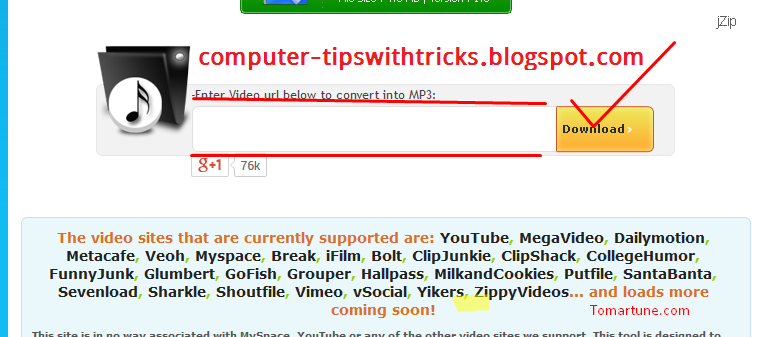
First go to this link Click to download youtube videos in mp3 format, you will see this picture shown bellow-


Then mark the red spot in the box and paste the link to your youtube video and then click download.
Then a few second you will verify the link and download will start automatically.  


Read more

Friday, September 16, 2016

Fast download youtube videos only video tutorial

,


watch this video the you can easily download youtube videos without any problems...

Read more

Sunday, June 19, 2016

Using Youtube on the Raspberry Pi without XBMC or gnash

,
There is an update to this here.

You can install this by pulling the source from git and running the InstallAUISuite.sh file.
Commands to install are below (your user should have sudo priveledges but you dont need to sudo or be root to run the commands unless shown otherwise):

sudo apt-get install git-core
git clone git://github.com/StevenHickson/PiAUISuite.git
cd PiAUISuite/Install/
./InstallAUISuite.sh

Update Instructions 

cd PiAUISuite
git pull
cd Install
sudo ./UpdateAUISuite.sh


Demonstration:


So this is a quick video to demonstrate youtube working fast and easily on the Raspberry Pi without the use of XBMC or gnash.
I tried out gnash first which didnt work at all.
So then I tried out XBMC and although it is pretty, it is awfully slow so I decided to get youtube to work on my own.
The basis of this is really simple. There is a nifty program out there called youtube-dl that can get the media file from the website and download it. Its great because it does it fast and works for many other websites like the daily show and the colbert report.
So what I did was basically write a little script that analyzes your input and then gets the proper information from the youtube-dl program without downloading the video, then it sends this http stream to omxplayer to play.
It can handle playlists or individual files from multiple websites as well as a bunch of other things.

After that, I started implementing a nice little search feature using C++ and Curl.
Im starting to implement a GUI which will essentially look like youtube kind of. Until then I have this nifty search tool, which was essentially my start to the GUI I am currently creating.

If youve ever used XBMCs youtube, you will notice that this is a lot faster, and in my opinion, easier to use and more natural. Plus it only requires a tiny file on your system as opposed to XBMCs massive footprint.

The nice part of having an easy command line program like this is that it can be incorporated into a lot of other things easily. For instance, I have incorporated it into my voicecommand script as shown in the video.

The source code can be found here. To install see the top.

Sources:
This post for using axel with the youtube-dl.
This page for the youtube-dl source and documentation.

 Consider donating to further my tinkering


Places you can find me
Read more

Monday, May 23, 2016

Rebtel introduce unlimited international calling for 1 month

,
Rebtel introduce unlimited international calling for $1/month
The Swedish VoIP provider, Rebtel, yesterday launched Rebel calling for its US customers, the package will allow US-based customers to access unlimited, free-app-to-app calling without necessarily using a WiFi connection.

Making international calls usually attracts ridiculous charge rates, much more using apps like Tango, Facetime ,WhatsApp and the likes requires a lot of data which in most cases are beyond whats budgeted.

Rebel app makes use of a WiFi connection to place an app-to-app call, but the calls are routed through local phone lines, this process does not require data nor WiFi, allowing users to make international calls easily without having to break their data plans.

Rebel is free in more than 50 countries including the U.S., the service comes with a cheaply cost of $1/month from 2017. In case, Rebel calling service is not available in your jurisdiction, users can make use of  Rebtel calling service for $2/month, to use this service you must be connected to the internet.


TechCrunch
Read more

Friday, April 15, 2016

Youtube project 1

,


XTRA NORMAL
Read more

Tuesday, February 2, 2016

Released Data Set Features Extracted From YouTube Videos for Multiview Learning

,

“If it looks like a duck, swims like a duck, and quacks like a duck, then it probably is a duck.”
The “duck test”.

Performance of machine learning algorithms, supervised or unsupervised, is often significantly enhanced when a variety of feature families, or multiple views of the data, are available. For example, in the case of web pages, one feature family can be based on the words appearing on the page, and another can be based on the URLs and related connectivity properties. Similarly, videos contain both audio and visual signals where in turn each modality is analyzed in a variety of ways. For instance, the visual stream can be analyzed based on the color and edge distribution, texture, motion, object types, and so on. YouTube videos are also associated with textual information (title, tags, comments, etc.). Each feature family complements others in providing predictive signals to accomplish a prediction or classification task, for example, in automatically classifying videos into subject areas such as sports, music, comedy, games, and so on.

We have released a dataset of over 100k feature vectors extracted from public YouTube videos. These videos are labeled by one of 30 classes, each class corresponding to a video game (with some amount of class noise): each video shows a gameplay of a video game, for teaching purposes for example. Each instance (video) is described by three feature families (textual, visual, and auditory), and each family is broken into subfamilies yielding up to 13 feature types per instance. Neither video identities nor class identities are released.

We hope that this dataset will be valuable for research on a variety of multiview related machine learning topics, including multiview clustering, co-training, active learning, classifier fusion and ensembles.

The data and more information can be obtained from the UCI machine learning repository (multiview video dataset), or from here.
Read more
 

Computer Info Copyright © 2016 -- Powered by Blogger