Showing posts with label online. Show all posts

Friday, January 13, 2017

A Comparison of Five Google Online Courses

,


Google has taught five open online courses in the past year, reaching nearly 400,000 interested students. In this post I will share observations from experiments with a year’s worth of these courses. We were particularly surprised by how the size of our courses evolved during the year; how students responded to a non-linear, problem-based MOOC; and the value that many students got out of the courses, even after the courses ended.

Observation #1: Course size
We have seen varying numbers of registered students in the courses. Our first two courses (Power Searching versions one and two) garnered significant interest with over 100,000 students registering for each course. Our more recent courses have attracted closer to 40,000 students each. It’s likely that this is a result of initial interest in MOOCs starting to decline as well as students realizing that online courses require significant commitment of time and effort. We’d like other MOOC content aggregators to share their results so that we can identify overall MOOC patterns.
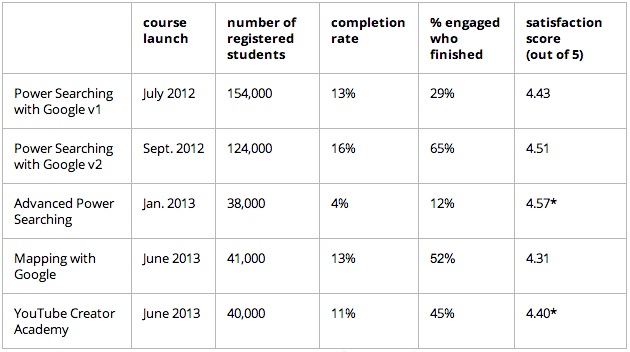
*based on surveys sent only to course completers. Other satisfaction scores represent aggregate survey results sent to all registrants.

Observation #2: Completion rates
Comparing these five two-week courses, we notice that most of them illustrate a completion rate (measured by the number of students who meet the course criteria for completion divided by the total number of registrants) of between 11-16%. Advanced Power Searching was an outlier at only 4%. Why? A possible answer can be found by comparing the culminating projects for each course: Power Searching consisted of students completing a multiple choice test; Advanced Power Searching students completed case studies of applying skills to research problems. After grading their work, students also had to solve a final search challenge.

Advanced Power Searching also differed from all of the other courses in the way it presented content and activities. Power Searching offered videos and activities in a highly structured, linear path; Advanced Power Searching presented students with a selection of challenges followed by supporting lessons. We observed a decreasing number of views on each challenge page similar to the pattern in the linear course (see figure 1).
Figure 1. Unique page views for Power Searching and Advanced Power Searching

Students who did complete Advanced Power Searching expressed satisfaction with the course (95% of course completing students would recommend the course to others, compared with 94% of survey respondents from Power Searching). We surmise that the lower completion rate for Advanced Power Searching compared to Power Searching could be a result of the relative difficulty of this course (it assumed significantly more foundational knowledge than Power Searching), the unstructured nature of the course, or a combination of these and other factors.

Even though completion rates seem low when compared with traditional courses, we are excited about the sheer number of students we’ve reached through our courses (over 51,000 earning certificates of completion). If we offered the same content to classrooms of 30 students, it would take over four and a half years of daily classes to teach the same information!

Observation #3: Students have varied goals
We would also like to move the discussion beyond completion rates. We’ve noticed that students register for online courses for many different reasons. In Mapping with Google, we asked students to select a goal during registration. We discovered that
  • 52% of registrants intended to complete the course
  • 48% merely wanted to learn a few new things about Google’s mapping tools
Post-course surveys revealed that
  • 78% of students achieved the goal they defined at registration
  • 89% of students learned new features of Google Maps
  • 76% reported learning new features of Google Earth
Though a much smaller percentage of students completed course requirements, these statistics show that many of the students attained their learning goals.

Observation #4: Continued interest in post-course access
After each course ended, we kept many of the course materials (videos, activities) available. Though we removed access to the forums, final projects/assessments, and teaching assistants, we have seen significant interest in the content as measured by Google and YouTube Analytics. The Power Searching course pages have generated nearly three million page views after the courses finished; viewers have watched over 160,000 hours (18 years!) of course videos. In the two months since Mapping with Google finished, we have seen over 70,000 unique visitors to the course pages.

In all of our courses, we saw a high number of students interested in learning online: 96% of Power Searching participants agreed or strongly agreed that they would take a course in a similar format. We have succeeded in teaching tens of thousands of students to be more savvy users of Google tools. Future posts will take an in-depth look at our experiments with self-graded assessments, community elements that enhance learning, and design elements that influence student success.
Read more

Friday, December 23, 2016

Making online learning even easier with a re envisioned Course Builder

,


(Cross-posted on the Google for Education blog)

The Course Builder team believes in enabling new and better ways to learn (for both the instructor and learner). Todays release of Course Builder v1.10 furthers these goals in three ways, by being easier to use, embeddable and applicable to more types of content.

Easier to use
We took a step back and re-envisioned the menus and navigation of the administrative interface based on the steps instructors take as they create a course. These are designed to help you through the process of creating, styling, publishing and managing your courses. This re-imagined design gives a solid foundation for future versions of Course Builder.
A completely redesigned navigation simplifies content authoring and configuration.
To support this redesign, we’ve also completely revamped our documentation. There’s now one home for all of Course Builder’s materials: Google Open Online Education. Here, you’ll find everything you need to conceptualize and construct your content, create a course using Course Builder, and even develop new modules to extend Course Builder’s capabilities. The content now reflects the latest features and organization. This re-imagined design gives a solid foundation for future versions of Course Builder.

Embeddable assessment support
What if you want to use some of Course Builder’s features but already have an existing learning site? To help with these situations, Course Builder now supports embeddable assessments (graded questions and answers with an optional due date). Simply create your assessments in Course Builder, copy the JavaScript snippet and paste it on any site. Your users will be able to complete the assessments from the comfort of your existing site and you’ll be able to benefit from Course Builder’s per-question feedback, auto-grading and analytics with just two short lines of code that are automatically generated for you.

We started with embeddable assessments because evaluation is so important to learning, but we don’t plan to stop there. Watch for additional embeddable components in the future.

Applicable to more types of content
Many types of online learning content, like tutorials, exercises and documentation, are a lot like online courses. For instance, they might involve presenting content to users, having them do exercises or assessments and allowing them to stop and return later. Yet, you might not think of them as traditional courses.

To make Course Builder a better fit for a broader set of online content, we’ve added a new “guides” experience. Guides are a new way for students to browse and consume your content. Compared to typical online courses -- which can enforce a strict linear path (from unit 1 to unit 2, etc.) -- guides present your content as a non-numbered list. Users are free to enter and exit in any order. It also allows you to show the content for many courses together.

You could imagine each guide being a documentation page or tutorial section. Guides also work with any existing Course Builder units and can be made available by simply enabling that feature in the dashboard. Here are a couple of our courses, when viewed as guides:

Within each guide, the user is guided through the steps, which could be portions of a docs page or lessons in a unit, as in this example from the “Power Searching with Google” sample course:

By letting users jump in and out of the content as they like, guides are ideally suited to the on-the-go learner and look great on phones and tablets. It’s our first foray into responsive mobile design... but it won’t be our last.

Guides currently support public courses, but we’ll be adding registration, enhanced statefulness and interface customization, as well as elements of dynamic learning (think of a personalized list of guides).

This release has focused on making Course Builder easier to use and more relevant. It sets up the framework to give future features a natural home. It adds embeddable assessments to make Course Builder useful in more places. And it introduces guides, a new, less linear format for consuming content.

For a full list of features, see the release notes, and let us know what you think. Keep on learning!
Read more

British Pathé newsreals online

,

British Pathé was a producer of newsreels, cinemagazines, and documentaries from 1910 until 1970 in the United Kingdom. Over 90,000 clips are now available online from the Pathé website. So this isnt a strictly off-topic post. If you enter "computer" as a search term youll see a collection of clips dating back as far as 1949 (an electronic machine that plays noughts and crosses). If you have an interest in history Im sure youll find this site fascinating - try using your home town as a search term, you may be surprised by the breadth of Pathés coverage.

from The Universal Machine http://universal-machine.blogspot.com/

IFTTT

Put the internet to work for you.

Turn off or edit this Recipe

Read more

Friday, November 25, 2016

Learning Digital Skills online with Google Activate

,


According to Eurostat data, over 5 million people under age 25 are currently out of work in Europe, in contrast to an increasing demand for people with digital skills such as Digital Marketing, Big Data, Ecommerce, Mobile App Development and Cloud Computing. In particular, Spanish employers are finding it difficult to find individuals with the right skills, due to the lack of the digital education available.

In an effort to make contributions towards solving Spain’s unemployment in this sector, Google Spain, the Spanish Ministry of Industry through their business school EOI, Universidad Complutense de Madrid and Interactive Advertising Bureau (IAB) are collaborating to build Google Activate, a series of massive open online courses (MOOCs) dedicated to teach digital skills to the young unemployed people in Spain. This is an example of how online education can be scaled to address educational and economic issues.

The inspiration for Google Activate began with the summer 2012 launch of Course Builder, an experimental platform developed on Google technologies designed to provide the capability for anyone to create an online environment that can be used for a wide variety of education-related activities. In September of that same year, Course Builder was made available in Europe, as part of the Google Faculty Summit in London.

Among the early adopters of Course Builder in Europe was a partnership that included the University of Alicante, who in October 2012 launched Unimooc Aemprende, a MOOC for entrepreneurs. This is just one example of the use of Course Builder to build a MOOC designed to solve a broad problem, in this case the acquisition of skills for launching a small business. More than 30,000 people have participated in Unimooc since its launch.

As of today, more than 148,000 people have registered for Activate with 13% of participants earning a certificate, which is obtained after 13 exams certified by either the EOI, Universidad Complutense de Madrid or or the IAB (Interactive Advertising Bureau). Such certificates are being used by the awardees in their LinkedIn profile to position themselves for a job in the digital economy, where many jobs are being created. More than 19,000 students are already certified in one of the 5 digital areas.

Google Activate has plans to increase the number of students with digital skills reaching 160,000 with plans to expand further to other countries in the world.
Read more

Thursday, September 15, 2016

The Plan to Build a Massive Online Brain for All the World’s Robots

,

This is a clever idea (in fact I thought of it a few years ago as well). Now with excellent WiFi and 4G connectivity there is no need for an individual robot to carry all its processing power onboard. Instead they can delegate some decisions to the cloud. Wired recently reported on a project to do just this - to build a massive robot brain in the c loud. Indeed I believe that Googles driverless cars can also use the cloud to aid their decision making. I cant find a link for this so would be grateful if a reader who knows a relevant URl could comment.

from The Universal Machine http://universal-machine.blogspot.com/

IFTTT

Put the internet to work for you.

Turn off or edit this Recipe

Read more

Tuesday, July 26, 2016

computer tips some useful tips for your compele online security

,
computer tips


  the goal of every good thing if the neighborhood has seen some of the worst aspects. Just as with Internet viruses, etc.(computer tips) . Though this is the beginning of things, but the latest plan premium over the last few years with the increased use of the Internet against the step, step increases in these activities continues icon sad some tips for you to complete online security include it with the hacking.


Computer Info Copyright © 2016 -- Powered by Blogger